Auto Animation
Auto Blink and Auto Breathe take care of the two things a character does all the time and an animator never wants to key by hand. Both write ordinary keys, each press on an animation layer of its own, so the result is yours to mute, re-weight, edit or delete like any other layer. Both are in the rig node's Auto Animation folder.
Auto Blink
Add Auto Blink keys face_Eye_Blink_L and face_Eye_Blink_R over the Frame Range, on a layer named AutoBlink (then AutoBlink2, and so on). It's one undo step, and it's greyed out on a body-only rig.
- Profile uses iClone's own Auto Blink profiles: Normal, Nervous, Speechless, Charming and Child. They differ in how often the character blinks, how long a blink lasts, and how often blinks come in quick runs.
- Clip Blinks decides what happens to blinks already in the animation. Keep leaves them, makes an additive layer, and skips any blink that would land right on top of one of the clip's. Replace makes an override layer, so inside the Frame Range the eyelids blink only when Auto Blink says so; outside it, the clip's own blinks are untouched.
- Seed gives a different pattern with the same profile. To try another, delete the layer, change the Seed and press again.
- Frame Range follows the playback range until you type your own. Right-click it and choose Revert to Defaults to make it follow the playback range again.
Use Keep on a clip whose face already performs (a dialogue take), and Replace when the clip's blinks are missing, too regular, or wrong for the shot. To see exactly what was written, make the AutoBlink layer active and press Show Face Keys; see Face Tools.
Auto Breathe
Add Auto Breathe keys breathing onto an additive layer named AutoBreathe (then AutoBreathe2, and so on). It moves body controls only, so it needs no facial rig and works on a body-only rig too.
- Profile: Calm is about 12 breaths a minute and shallow, Normal about 16, Heavy about 30 and deep with the shoulders lifting, Sleeping about 10, slow and deep, from the ribs.
- Depth scales the breaths: 1 is the profile as it comes, 2 twice as far. The layer's weight scales them again, and you can key it to make the breathing build or settle.
- Seed and Frame Range work as they do for Auto Blink.
What moves: the chest control tilts back and lifts a little, the two ribcage controls (L_RibsTwist, R_RibsTwist) move forward and up, and on Calm, Normal and Heavy the clavicles lift the shoulders. The neck turns back by the chest's tilt, so the head keeps its aim, and the hands stay where the clip holds them. Only whole breaths inside the Frame Range are written, so the layer adds nothing outside them.
Look At
The eyes can aim at two kinds of target, and the Look At slider on the Eyes gear chooses between them.
- Each eye has its own small cross in front of it, inside a yellow frame. The crosses ride with the head and normally sit where the clip puts the gaze, so the clip's eye motion lives on them. Animate glances here.
- The yellow three-ring control, about a metre in front of the face, stays put in the world. Park it on another character, an object or the camera, and the eyes stay on it whatever the head and body do.
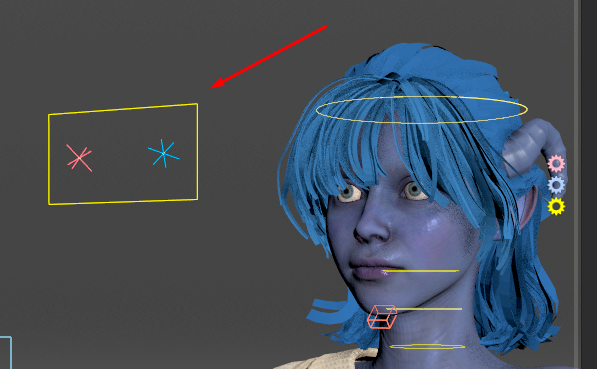
At 0 the crosses stay with the clip and the yellow target does nothing. At 1 the crosses sit on the yellow target, the eyes look at it, and the head and chest turn to help, as much as Head Weight and Body Weight say. In between, they sit partway. So moving the slider moves the crosses back and forth; that's intended, not a glitch.
Why two targets? They do different jobs, and neither can do both. A target that rides with the head can't steer the head without chasing itself; a target fixed in the world would drag the eyes against every head move. So Look At blends from the first to the second, the way iClone's Look At does.